STM32和7针OLED显示屏
硬件:
- STM32F103C8T6
- SSD1306 OLED 7 PIN
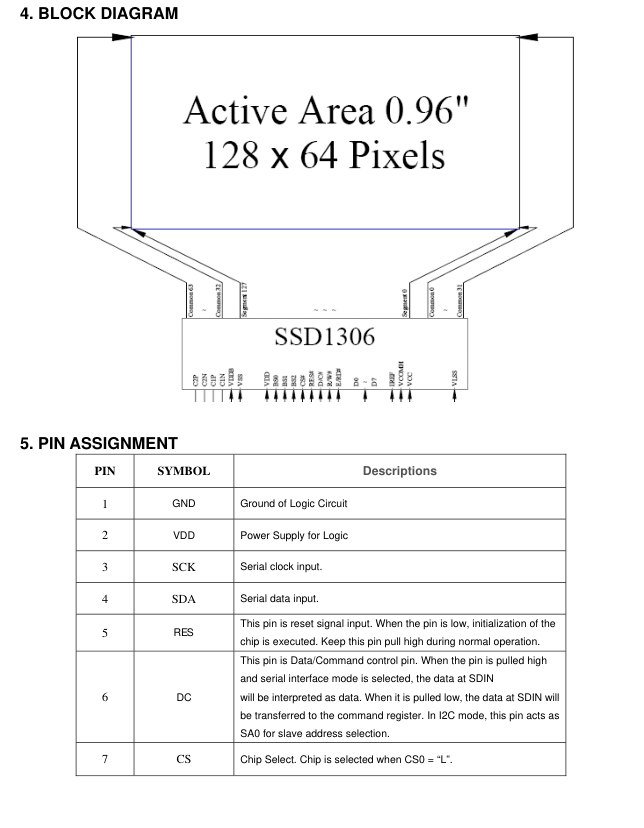
这里采用 4‑wire SPI mode 在此模式下:
- The interface is write-only (no data read). 只写模式
- Data is sent MSB first. 数据以最高有效位(MSB)优先的方式发送
- Every 8 clock pulses transfer one byte. 每8个时钟脉冲传输一个字节
SSD1306 → STM32F103C8T6 Wiring(连线)
STM32F103选择 SPI1 全双工(Full-Duplex Master)
| SSD1306 Pin | Function | Connect to STM32 Pin |
|---|---|---|
| GND | Ground | GND |
| VDD | Power Supply (3.3V logic) | 3.3V |
| SCK | SPI Clock | PA5 (SPI1_SCK) |
| SDA | Serial Data (MOSI) | PA7 (SPI1_MOSI) |
| RES | Reset | Any GPIO, e.g., PA0 |
| DC | Data/Command Select | Any GPIO, e.g., PA1 |
| CS | Chip Select | Any GPIO, e.g., PA4 (SPI1_NSS or manual control) |
不要使用5V电压(不确定,需要问硬件客服确认)
STM32CubeMX配置(configure)
Let's go step‑by‑step through the exact configuration process to make it work reliably with your STM32F103C8T6 (Blue Pill).让我们一步步详细了解配置过程,以确保它与你的 STM32F103C8T6(蓝药丸)稳定工作。
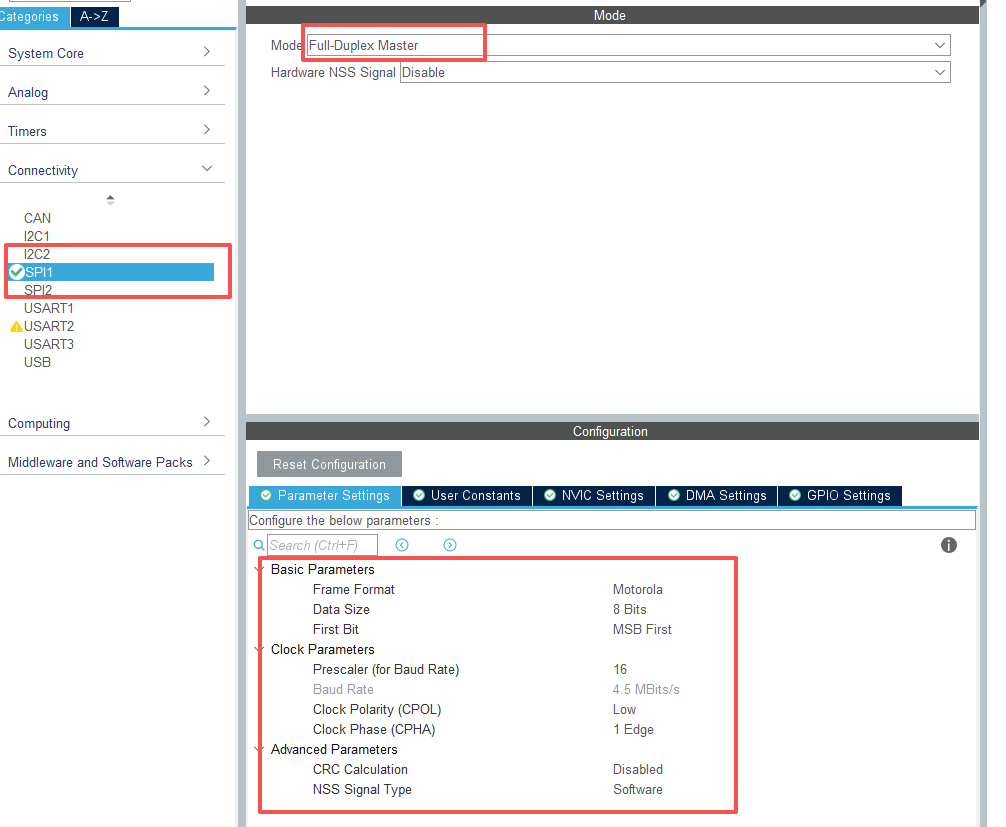
Even though SSD1306 is write-only, Full Duplex is more stable on STM32 HAL
PA0, PA1, PA4 都设置为GPIO_Output模式,推挽输出(Output Push‑Pull),No Pull,Low
时钟配置 Keep system clock at 72 MHz (HSE + PLL). 然后点击 STM32CubeMX 中生成代码
SSD1306 原理
The SSD1306 has GDDRAM (Graphic Display Data RAM) — an internal 128 × 64 bit memory. SSD1306 拥有 GDDRAM(图形显示数据 RAM)——一个内部 128 × 64 位的内存
每一位代码一个像素,1表示开,0表示关
Display (128x64)
↑
|  Page 7 (y = 56 to 63)
|  Page 6
|  Page 5
|  Page 4
|  Page 3
|  Page 2
|  Page 1
|  Page 0 (y = 0 to 7)
|
+---------------------------------> X (0–127)
水平方向 128 位表示 128 像素,垂直方向8个分页,每页有8个像素,8×8=64,8bit=1Byte,也就是每个字节控制8个垂直像素。
要显示内容需要按照以下步骤:
- Set the page address(0-7)
- Set the column address(0-127)
- Send data bytes
GDDRAM 访问命令
| Command | Function |
|---|---|
0xB0 + page |
Select page (0–7) |
0x00 + (column & 0x0F) |
Lower nibble of column address(低位) |
0x10 + ((column >> 4) & 0x0F) |
Higher nibble of column address(高位) |
OLED_WriteData(byte) |
Write pixel data to screen |
功能规格
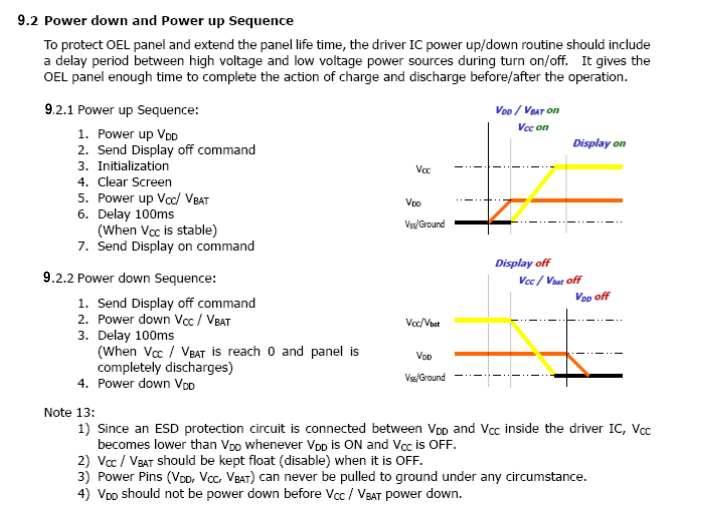
这是 Power up 和 Power down 的顺序图
Power up
- Vdd 上电
- 发送 Display off 命令
- 初始化
- Clear Screen
- Power up Vcc(OLED内部实现)
- Delay 100ms
- Send Display on command
Power down
- 发送 Display off 命令
- Vcc 下电
- Delay 100ms
- Vdd 下电
根据手册和时序图来实现功能
代码部分
先声明几个函数
void OLED_WriteCommand(uint8_t cmd);
void OLED_WriteData(uint8_t data);
void OLED_Reset(void);
void OLED_Init(void);
void OLED_Clear(void);
void OLED_ClearArea(uint8_t x, uint8_t page, uint8_t width, uint8_t page_count);
void OLED_SetCursor(uint8_t x, uint8_t page);
void OLED_WriteCommand(uint8_t cmd) {
HAL_GPIO_WritePin(OLED_DC_PORT, OLED_DC_PIN, GPIO_PIN_RESET); // Command
HAL_GPIO_WritePin(OLED_CS_PORT, OLED_CS_PIN, GPIO_PIN_RESET);
HAL_SPI_Transmit(&hspi1, &cmd, 1, HAL_MAX_DELAY);
HAL_GPIO_WritePin(OLED_CS_PORT, OLED_CS_PIN, GPIO_PIN_SET);
}void OLED_WriteData(uint8_t data) {
HAL_GPIO_WritePin(OLED_DC_PORT, OLED_DC_PIN, GPIO_PIN_SET); // Data
HAL_GPIO_WritePin(OLED_CS_PORT, OLED_CS_PIN, GPIO_PIN_RESET);
HAL_SPI_Transmit(&hspi1, &data, 1, HAL_MAX_DELAY);
HAL_GPIO_WritePin(OLED_CS_PORT, OLED_CS_PIN, GPIO_PIN_SET);
}void OLED_Reset(void) {
HAL_GPIO_WritePin(OLED_RES_PORT, OLED_RES_PIN, GPIO_PIN_RESET);
HAL_Delay(10);
HAL_GPIO_WritePin(OLED_RES_PORT, OLED_RES_PIN, GPIO_PIN_SET);
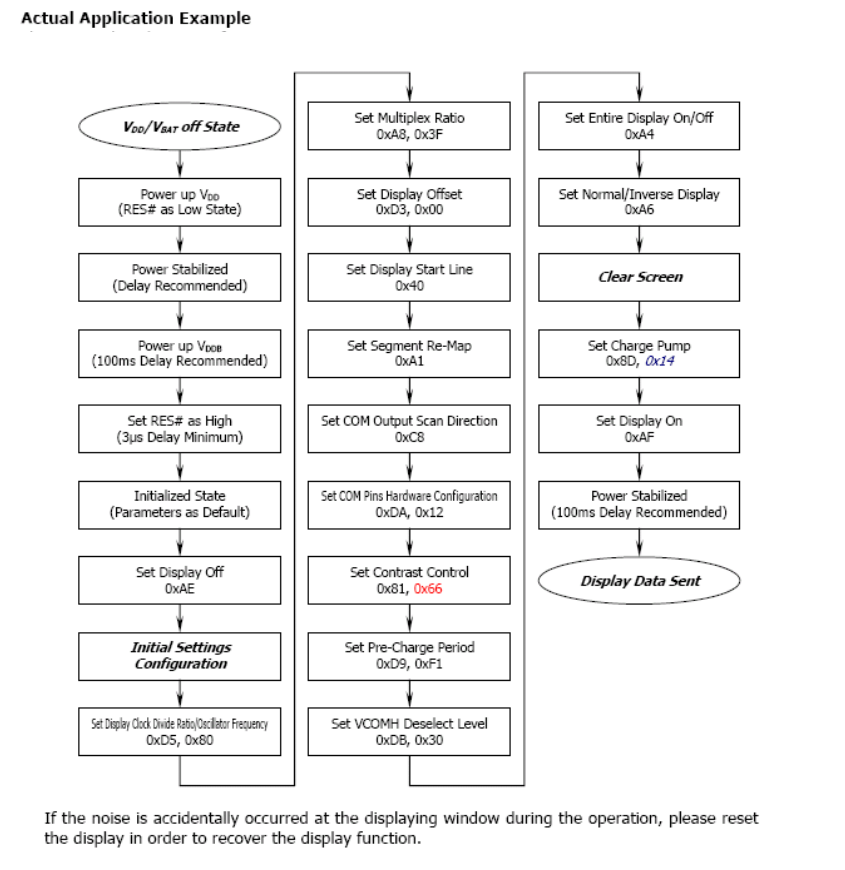
}重点是初始化函数,根据上面时序图设计初始化代码
void OLED_Init(void) {
    HAL_Delay(100); // Wait for more than 100ms
    OLED_Reset(); // Hardware reset

    OLED_WriteCommand(0xAE); // Display off
    OLED_WriteCommand(0xD5); OLED_WriteCommand(0x80); // Set display clock divide ratio/oscillator frequency
    OLED_WriteCommand(0xA8); OLED_WriteCommand(0x3F); // Set multiplex ratio (1 to 64)
    OLED_WriteCommand(0xD3); OLED_WriteCommand(0x00); // Set display offset, No offset
    OLED_WriteCommand(0x40); // Set display start line to 0
    OLED_WriteCommand(0xA1); // Set segment re-map 0xA0->0xA1 (mirror horizontally)
    // OLED_WriteCommand(0x20); OLED_WriteCommand(0x00); // Memory addressing mode: horizontal
    OLED_WriteCommand(0xC8); // Set COM scan direction (remapped mode, vertical flip)
    OLED_WriteCommand(0xDA); OLED_WriteCommand(0x12); // Set COM pins hardware configuration
    OLED_WriteCommand(0x81); OLED_WriteCommand(0x7F); // Contrast control, RESET = 7Fh
    OLED_WriteCommand(0xD9); OLED_WriteCommand(0xF1); // Set pre-charge period
    OLED_WriteCommand(0xDB); OLED_WriteCommand(0x20); // Set Vcom detect, RESET = 20h
    OLED_WriteCommand(0xA4); // Entire display ON (resume RAM content display)
    OLED_WriteCommand(0xA6); // Set Normal display (not inverted)
    OLED_WriteCommand(0x8D); OLED_WriteCommand(0x14); // Enable charge pump, Enable charge pump regulator
    HAL_Delay(100); // Power stabilized delay (recommended ~100ms)
    OLED_WriteCommand(0xAF); // Display ON
}
void OLED_Clear(void)
{
uint8_t i, j;
for (i = 0; i < 8; i++) // 8 pages total (for 64 rows)
{
OLED_SetCursor(0, i);
for (j = 0; j < 128; j++)
{
OLED_WriteData(0x00); // All pixels OFF
}
}
}void OLED_SetCursor(uint8_t x, uint8_t page)
{
OLED_WriteCommand(0xB0 + page); // page (0..7)
OLED_WriteCommand(0x00 | (x & 0x0F)); // low column
OLED_WriteCommand(0x10 | (x >> 4)); // high column
}至此,前期准备结束。下面开始在屏幕上显示内容。
要显示字符或者字符串需要三样东西:
- 一个字体表【A font table (bitmaps for each character)】
- 一个在(x, page)处绘制单个字符的函数【A function to draw one character at
(x, page)】 - 一个通过循环调用字符函数来绘制字符串的函数
创建一个 6×8 的 ASCII 小字体表
font6x8.h
#ifndef FONT6X8_H
#define FONT6X8_H

#include <stdint.h>

// 6x8 font, each character = 6 bytes (6 columns x 8 rows)
// Characters from ASCII 0x20 (' ') to 0x7E ('~')
extern const uint8_t Font6x8[][6];

#endif
font6x8.c
#include "font6x8.h"

// Source: classic 5x7 font extended to 6x8 (1 column spacing)
// Each entry: {col0, col1, col2, col3, col4, col5}
const uint8_t Font6x8[][6] =
{
    // ASCII 0x20 ' '
    {0x00,0x00,0x00,0x00,0x00,0x00}, // ' '
    {0x00,0x00,0x5F,0x00,0x00,0x00}, // '!'
    {0x00,0x07,0x00,0x07,0x00,0x00}, // '"'
    {0x14,0x7F,0x14,0x7F,0x14,0x00}, // '#'
    {0x24,0x2A,0x7F,0x2A,0x12,0x00}, // '$'
    {0x23,0x13,0x08,0x64,0x62,0x00}, // '%'
    {0x36,0x49,0x55,0x22,0x50,0x00}, // '&'
    {0x00,0x05,0x03,0x00,0x00,0x00}, // '''
    {0x00,0x1C,0x22,0x41,0x00,0x00}, // '('
    {0x00,0x41,0x22,0x1C,0x00,0x00}, // ')'
    {0x14,0x08,0x3E,0x08,0x14,0x00}, // '*'
    {0x08,0x08,0x3E,0x08,0x08,0x00}, // '+'
    {0x00,0x50,0x30,0x00,0x00,0x00}, // ','
    {0x08,0x08,0x08,0x08,0x08,0x00}, // '-'
    {0x00,0x60,0x60,0x00,0x00,0x00}, // '.'
    {0x20,0x10,0x08,0x04,0x02,0x00}, // '/'

    {0x3E,0x51,0x49,0x45,0x3E,0x00}, // '0'
    {0x00,0x42,0x7F,0x40,0x00,0x00}, // '1'
    {0x42,0x61,0x51,0x49,0x46,0x00}, // '2'
    {0x21,0x41,0x45,0x4B,0x31,0x00}, // '3'
    {0x18,0x14,0x12,0x7F,0x10,0x00}, // '4'
    {0x27,0x45,0x45,0x45,0x39,0x00}, // '5'
    {0x3C,0x4A,0x49,0x49,0x30,0x00}, // '6'
    {0x01,0x71,0x09,0x05,0x03,0x00}, // '7'
    {0x36,0x49,0x49,0x49,0x36,0x00}, // '8'
    {0x06,0x49,0x49,0x29,0x1E,0x00}, // '9'

    {0x00,0x36,0x36,0x00,0x00,0x00}, // ':'
    {0x00,0x56,0x36,0x00,0x00,0x00}, // ';'
    {0x08,0x14,0x22,0x41,0x00,0x00}, // '<'
    {0x14,0x14,0x14,0x14,0x14,0x00}, // '='
    {0x00,0x41,0x22,0x14,0x08,0x00}, // '>'
    {0x02,0x01,0x51,0x09,0x06,0x00}, // '?'
    {0x32,0x49,0x79,0x41,0x3E,0x00}, // '@'

    {0x7E,0x11,0x11,0x11,0x7E,0x00}, // 'A'
    {0x7F,0x49,0x49,0x49,0x36,0x00}, // 'B'
    {0x3E,0x41,0x41,0x41,0x22,0x00}, // 'C'
    {0x7F,0x41,0x41,0x22,0x1C,0x00}, // 'D'
    {0x7F,0x49,0x49,0x49,0x41,0x00}, // 'E'
    {0x7F,0x09,0x09,0x09,0x01,0x00}, // 'F'
    {0x3E,0x41,0x49,0x49,0x7A,0x00}, // 'G'
    {0x7F,0x08,0x08,0x08,0x7F,0x00}, // 'H'
    {0x00,0x41,0x7F,0x41,0x00,0x00}, // 'I'
    {0x20,0x40,0x41,0x3F,0x01,0x00}, // 'J'
    {0x7F,0x08,0x14,0x22,0x41,0x00}, // 'K'
    {0x7F,0x40,0x40,0x40,0x40,0x00}, // 'L'
    {0x7F,0x02,0x0C,0x02,0x7F,0x00}, // 'M'
    {0x7F,0x04,0x08,0x10,0x7F,0x00}, // 'N'
    {0x3E,0x41,0x41,0x41,0x3E,0x00}, // 'O'
    {0x7F,0x09,0x09,0x09,0x06,0x00}, // 'P'
    {0x3E,0x41,0x51,0x21,0x5E,0x00}, // 'Q'
    {0x7F,0x09,0x19,0x29,0x46,0x00}, // 'R'
    {0x46,0x49,0x49,0x49,0x31,0x00}, // 'S'
    {0x01,0x01,0x7F,0x01,0x01,0x00}, // 'T'
    {0x3F,0x40,0x40,0x40,0x3F,0x00}, // 'U'
    {0x1F,0x20,0x40,0x20,0x1F,0x00}, // 'V'
    {0x3F,0x40,0x38,0x40,0x3F,0x00}, // 'W'
    {0x63,0x14,0x08,0x14,0x63,0x00}, // 'X'
    {0x07,0x08,0x70,0x08,0x07,0x00}, // 'Y'
    {0x61,0x51,0x49,0x45,0x43,0x00}, // 'Z'

    {0x00,0x7F,0x41,0x41,0x00,0x00}, // '['
    {0x02,0x04,0x08,0x10,0x20,0x00}, // '\'
    {0x00,0x41,0x41,0x7F,0x00,0x00}, // ']'
    {0x04,0x02,0x01,0x02,0x04,0x00}, // '^'
    {0x40,0x40,0x40,0x40,0x40,0x00}, // '_'
    {0x00,0x01,0x02,0x04,0x00,0x00}, // '`'

    {0x20,0x54,0x54,0x54,0x78,0x00}, // 'a'
    {0x7F,0x48,0x44,0x44,0x38,0x00}, // 'b'
    {0x38,0x44,0x44,0x44,0x20,0x00}, // 'c'
    {0x38,0x44,0x44,0x48,0x7F,0x00}, // 'd'
    {0x38,0x54,0x54,0x54,0x18,0x00}, // 'e'
    {0x08,0x7E,0x09,0x01,0x02,0x00}, // 'f'
    {0x0C,0x52,0x52,0x52,0x3E,0x00}, // 'g'
    {0x7F,0x08,0x04,0x04,0x78,0x00}, // 'h'
    {0x00,0x44,0x7D,0x40,0x00,0x00}, // 'i'
    {0x20,0x40,0x44,0x3D,0x00,0x00}, // 'j'
    {0x7F,0x10,0x28,0x44,0x00,0x00}, // 'k'
    {0x00,0x41,0x7F,0x40,0x00,0x00}, // 'l'
    {0x7C,0x04,0x18,0x04,0x78,0x00}, // 'm'
    {0x7C,0x08,0x04,0x04,0x78,0x00}, // 'n'
    {0x38,0x44,0x44,0x44,0x38,0x00}, // 'o'
    {0x7C,0x14,0x14,0x14,0x08,0x00}, // 'p'
    {0x08,0x14,0x14,0x18,0x7C,0x00}, // 'q'
    {0x7C,0x08,0x04,0x04,0x08,0x00}, // 'r'
    {0x48,0x54,0x54,0x54,0x20,0x00}, // 's'
    {0x04,0x3F,0x44,0x40,0x20,0x00}, // 't'
    {0x3C,0x40,0x40,0x20,0x7C,0x00}, // 'u'
    {0x1C,0x20,0x40,0x20,0x1C,0x00}, // 'v'
    {0x3C,0x40,0x30,0x40,0x3C,0x00}, // 'w'
    {0x44,0x28,0x10,0x28,0x44,0x00}, // 'x'
    {0x0C,0x50,0x50,0x50,0x3C,0x00}, // 'y'
    {0x44,0x64,0x54,0x4C,0x44,0x00}, // 'z'

    {0x00,0x08,0x36,0x41,0x00,0x00}, // '{'
    {0x00,0x00,0x7F,0x00,0x00,0x00}, // '|'
    {0x00,0x41,0x36,0x08,0x00,0x00}, // '}'
    {0x08,0x04,0x08,0x10,0x08,0x00}, // '~'
};
现在你拥有了一个适用于所有可打印 ASCII 字符的单色字体。
在oled.h中添加函数原型
// New functions: 6x8
void OLED_DrawChar(uint8_t x, uint8_t page, char c);
void OLED_DrawString(uint8_t x, uint8_t page, const char *str);在oled.c添加字体和函数实现
#include "oled.h"
#include "font6x8.h"

// ...

void OLED_DrawChar(uint8_t x, uint8_t page, char c)
{
    // We only have printable characters 0x20..0x7E
    if ((uint8_t)c < 0x20 || (uint8_t)c > 0x7E) {
        c = '?'; // fallback
    }

    uint8_t index = (uint8_t)c - 0x20; // map ASCII to font index

    OLED_SetCursor(x, page);

    for (uint8_t i = 0; i < 6; i++) { // 6 columns per char
        OLED_WriteData(Font6x8[index][i]);
    }
}

void OLED_DrawString(uint8_t x, uint8_t page, const char *str)
{
    while (*str) {
        // If we reach right edge, go to next page (simple wrap)
        if (x > OLED_WIDTH - 6) {
            x = 0;
            page++;
            if (page >= 8) { // no more space
                break;
            }
        }

        OLED_DrawChar(x, page, *str);
        x += 6;    // move to next character position
        str++;     // next character in C string
    }
}在main.c中使用
int main(void)
{
    HAL_Init();
    SystemClock_Config();
    MX_GPIO_Init();
    MX_SPI1_Init();

    OLED_Init();
    OLED_Clear();

    // One character "A" at x=0, page=0 (top-left)
    OLED_DrawChar(0, 0, 'A');

    // "Hello world!" starting at x=0, page=1 (second text line)
    OLED_DrawString(0, 1, "Hello world!");

    while (1) {
        // your loop
    }
}
完成三样东西后,屏幕能够显示字符和字符串了,但是看起来字体太小了。因为 6×8 的字体就是这么小,如果要放大字体,那么需要使用更大的位图字体(bitmap font),例如 8×16,16×16
定义 8×16 字体
font8x16.h
#ifndef FONT8X16_H
#define FONT8X16_H

#include <stdint.h>

// 6x8 font, each character = 6 bytes (6 columns x 8 rows)
// Characters from ASCII 0x20 (' ') to 0x7E ('~')
extern const uint8_t Font8x16[][16];

#endif
font8x16.c
#include "font8x16.h"
// From https://github.com/datacute/Tiny4kOLED/blob/master/src/font8x16.h
const uint8_t Font8x16[][16] =
{
  0x00,0x00,0x00,0x00,0x00,0x00,0x00,0x00,0x00,0x00,0x00,0x00,0x00,0x00,0x00,0x00, //   0
  0x00,0x00,0x00,0xF8,0x00,0x00,0x00,0x00,0x00,0x00,0x00,0x33,0x30,0x00,0x00,0x00, // ! 1
  0x00,0x10,0x0C,0x06,0x10,0x0C,0x06,0x00,0x00,0x00,0x00,0x00,0x00,0x00,0x00,0x00, // " 2
  0x40,0xC0,0x78,0x40,0xC0,0x78,0x40,0x00,0x04,0x3F,0x04,0x04,0x3F,0x04,0x04,0x00, // # 3
  0x00,0x70,0x88,0xFC,0x08,0x30,0x00,0x00,0x00,0x18,0x20,0xFF,0x21,0x1E,0x00,0x00, // $ 4
  0xF0,0x08,0xF0,0x00,0xE0,0x18,0x00,0x00,0x00,0x21,0x1C,0x03,0x1E,0x21,0x1E,0x00, // % 5
  0x00,0xF0,0x08,0x88,0x70,0x00,0x00,0x00,0x1E,0x21,0x23,0x24,0x19,0x27,0x21,0x10, // & 6
  0x10,0x16,0x0E,0x00,0x00,0x00,0x00,0x00,0x00,0x00,0x00,0x00,0x00,0x00,0x00,0x00, // ' 7
  0x00,0x00,0x00,0xE0,0x18,0x04,0x02,0x00,0x00,0x00,0x00,0x07,0x18,0x20,0x40,0x00, // ( 8
  0x00,0x02,0x04,0x18,0xE0,0x00,0x00,0x00,0x00,0x40,0x20,0x18,0x07,0x00,0x00,0x00, // ) 9
  0x40,0x40,0x80,0xF0,0x80,0x40,0x40,0x00,0x02,0x02,0x01,0x0F,0x01,0x02,0x02,0x00, // * 10
  0x00,0x00,0x00,0xF0,0x00,0x00,0x00,0x00,0x01,0x01,0x01,0x1F,0x01,0x01,0x01,0x00, // + 11
  0x00,0x00,0x00,0x00,0x00,0x00,0x00,0x00,0x80,0xB0,0x70,0x00,0x00,0x00,0x00,0x00, // , 12
  0x00,0x00,0x00,0x00,0x00,0x00,0x00,0x00,0x00,0x01,0x01,0x01,0x01,0x01,0x01,0x01, // - 13
  0x00,0x00,0x00,0x00,0x00,0x00,0x00,0x00,0x00,0x30,0x30,0x00,0x00,0x00,0x00,0x00, // . 14
  0x00,0x00,0x00,0x00,0x80,0x60,0x18,0x04,0x00,0x60,0x18,0x06,0x01,0x00,0x00,0x00, // / 15
  0x00,0xE0,0x10,0x08,0x08,0x10,0xE0,0x00,0x00,0x0F,0x10,0x20,0x20,0x10,0x0F,0x00, // 0 16
  0x00,0x10,0x10,0xF8,0x00,0x00,0x00,0x00,0x00,0x20,0x20,0x3F,0x20,0x20,0x00,0x00, // 1 17
  0x00,0x70,0x08,0x08,0x08,0x88,0x70,0x00,0x00,0x30,0x28,0x24,0x22,0x21,0x30,0x00, // 2 18
  0x00,0x30,0x08,0x88,0x88,0x48,0x30,0x00,0x00,0x18,0x20,0x20,0x20,0x11,0x0E,0x00, // 3 19
  0x00,0x00,0xC0,0x20,0x10,0xF8,0x00,0x00,0x00,0x07,0x04,0x24,0x24,0x3F,0x24,0x00, // 4 20
  0x00,0xF8,0x08,0x88,0x88,0x08,0x08,0x00,0x00,0x19,0x21,0x20,0x20,0x11,0x0E,0x00, // 5 21
  0x00,0xE0,0x10,0x88,0x88,0x18,0x00,0x00,0x00,0x0F,0x11,0x20,0x20,0x11,0x0E,0x00, // 6 22
  0x00,0x38,0x08,0x08,0xC8,0x38,0x08,0x00,0x00,0x00,0x00,0x3F,0x00,0x00,0x00,0x00, // 7 23
  0x00,0x70,0x88,0x08,0x08,0x88,0x70,0x00,0x00,0x1C,0x22,0x21,0x21,0x22,0x1C,0x00, // 8 24
  0x00,0xE0,0x10,0x08,0x08,0x10,0xE0,0x00,0x00,0x00,0x31,0x22,0x22,0x11,0x0F,0x00, // 9 25
  0x00,0x00,0x00,0xC0,0xC0,0x00,0x00,0x00,0x00,0x00,0x00,0x30,0x30,0x00,0x00,0x00, // : 26
  0x00,0x00,0x00,0x80,0x00,0x00,0x00,0x00,0x00,0x00,0x80,0x60,0x00,0x00,0x00,0x00, // ; 27
  0x00,0x00,0x80,0x40,0x20,0x10,0x08,0x00,0x00,0x01,0x02,0x04,0x08,0x10,0x20,0x00, // < 28
  0x40,0x40,0x40,0x40,0x40,0x40,0x40,0x00,0x04,0x04,0x04,0x04,0x04,0x04,0x04,0x00, // = 29
  0x00,0x08,0x10,0x20,0x40,0x80,0x00,0x00,0x00,0x20,0x10,0x08,0x04,0x02,0x01,0x00, // > 30
  0x00,0x70,0x48,0x08,0x08,0x08,0xF0,0x00,0x00,0x00,0x00,0x30,0x36,0x01,0x00,0x00, // ? 31
  0xC0,0x30,0xC8,0x28,0xE8,0x10,0xE0,0x00,0x07,0x18,0x27,0x24,0x23,0x14,0x0B,0x00, // @ 32
  0x00,0x00,0xC0,0x38,0xE0,0x00,0x00,0x00,0x20,0x3C,0x23,0x02,0x02,0x27,0x38,0x20, // A 33
  0x08,0xF8,0x88,0x88,0x88,0x70,0x00,0x00,0x20,0x3F,0x20,0x20,0x20,0x11,0x0E,0x00, // B 34
  0xC0,0x30,0x08,0x08,0x08,0x08,0x38,0x00,0x07,0x18,0x20,0x20,0x20,0x10,0x08,0x00, // C 35
  0x08,0xF8,0x08,0x08,0x08,0x10,0xE0,0x00,0x20,0x3F,0x20,0x20,0x20,0x10,0x0F,0x00, // D 36
  0x08,0xF8,0x88,0x88,0xE8,0x08,0x10,0x00,0x20,0x3F,0x20,0x20,0x23,0x20,0x18,0x00, // E 37
  0x08,0xF8,0x88,0x88,0xE8,0x08,0x10,0x00,0x20,0x3F,0x20,0x00,0x03,0x00,0x00,0x00, // F 38
  0xC0,0x30,0x08,0x08,0x08,0x38,0x00,0x00,0x07,0x18,0x20,0x20,0x22,0x1E,0x02,0x00, // G 39
  0x08,0xF8,0x08,0x00,0x00,0x08,0xF8,0x08,0x20,0x3F,0x21,0x01,0x01,0x21,0x3F,0x20, // H 40
  0x00,0x08,0x08,0xF8,0x08,0x08,0x00,0x00,0x00,0x20,0x20,0x3F,0x20,0x20,0x00,0x00, // I 41
  0x00,0x00,0x08,0x08,0xF8,0x08,0x08,0x00,0xC0,0x80,0x80,0x80,0x7F,0x00,0x00,0x00, // J 42
  0x08,0xF8,0x88,0xC0,0x28,0x18,0x08,0x00,0x20,0x3F,0x20,0x01,0x26,0x38,0x20,0x00, // K 43
  0x08,0xF8,0x08,0x00,0x00,0x00,0x00,0x00,0x20,0x3F,0x20,0x20,0x20,0x20,0x30,0x00, // L 44
  0x08,0xF8,0xF8,0x00,0xF8,0xF8,0x08,0x00,0x20,0x3F,0x00,0x3F,0x00,0x3F,0x20,0x00, // M 45
  0x08,0xF8,0x30,0xC0,0x00,0x08,0xF8,0x08,0x20,0x3F,0x20,0x00,0x07,0x18,0x3F,0x00, // N 46
  0xE0,0x10,0x08,0x08,0x08,0x10,0xE0,0x00,0x0F,0x10,0x20,0x20,0x20,0x10,0x0F,0x00, // O 47
  0x08,0xF8,0x08,0x08,0x08,0x08,0xF0,0x00,0x20,0x3F,0x21,0x01,0x01,0x01,0x00,0x00, // P 48
  0xE0,0x10,0x08,0x08,0x08,0x10,0xE0,0x00,0x0F,0x18,0x24,0x24,0x38,0x50,0x4F,0x00, // Q 49
  0x08,0xF8,0x88,0x88,0x88,0x88,0x70,0x00,0x20,0x3F,0x20,0x00,0x03,0x0C,0x30,0x20, // R 50
  0x00,0x70,0x88,0x08,0x08,0x08,0x38,0x00,0x00,0x38,0x20,0x21,0x21,0x22,0x1C,0x00, // S 51
  0x18,0x08,0x08,0xF8,0x08,0x08,0x18,0x00,0x00,0x00,0x20,0x3F,0x20,0x00,0x00,0x00, // T 52
  0x08,0xF8,0x08,0x00,0x00,0x08,0xF8,0x08,0x00,0x1F,0x20,0x20,0x20,0x20,0x1F,0x00, // U 53
  0x08,0x78,0x88,0x00,0x00,0xC8,0x38,0x08,0x00,0x00,0x07,0x38,0x0E,0x01,0x00,0x00, // V 54
  0xF8,0x08,0x00,0xF8,0x00,0x08,0xF8,0x00,0x03,0x3C,0x07,0x00,0x07,0x3C,0x03,0x00, // W 55
  0x08,0x18,0x68,0x80,0x80,0x68,0x18,0x08,0x20,0x30,0x2C,0x03,0x03,0x2C,0x30,0x20, // X 56
  0x08,0x38,0xC8,0x00,0xC8,0x38,0x08,0x00,0x00,0x00,0x20,0x3F,0x20,0x00,0x00,0x00, // Y 57
  0x10,0x08,0x08,0x08,0xC8,0x38,0x08,0x00,0x20,0x38,0x26,0x21,0x20,0x20,0x18,0x00, // Z 58
  0x00,0x00,0x00,0xFE,0x02,0x02,0x02,0x00,0x00,0x00,0x00,0x7F,0x40,0x40,0x40,0x00, // [ 59
  0x00,0x0C,0x30,0xC0,0x00,0x00,0x00,0x00,0x00,0x00,0x00,0x01,0x06,0x38,0xC0,0x00, // \ 60
  0x00,0x02,0x02,0x02,0xFE,0x00,0x00,0x00,0x00,0x40,0x40,0x40,0x7F,0x00,0x00,0x00, // ] 61
  0x00,0x00,0x04,0x02,0x02,0x02,0x04,0x00,0x00,0x00,0x00,0x00,0x00,0x00,0x00,0x00, // ^ 62
  0x00,0x00,0x00,0x00,0x00,0x00,0x00,0x00,0x80,0x80,0x80,0x80,0x80,0x80,0x80,0x80, // _ 63
  0x00,0x02,0x02,0x04,0x00,0x00,0x00,0x00,0x00,0x00,0x00,0x00,0x00,0x00,0x00,0x00, // ` 64
  0x00,0x00,0x80,0x80,0x80,0x80,0x00,0x00,0x00,0x19,0x24,0x22,0x22,0x22,0x3F,0x20, // a 65
  0x08,0xF8,0x00,0x80,0x80,0x00,0x00,0x00,0x00,0x3F,0x11,0x20,0x20,0x11,0x0E,0x00, // b 66
  0x00,0x00,0x00,0x80,0x80,0x80,0x00,0x00,0x00,0x0E,0x11,0x20,0x20,0x20,0x11,0x00, // c 67
  0x00,0x00,0x00,0x80,0x80,0x88,0xF8,0x00,0x00,0x0E,0x11,0x20,0x20,0x10,0x3F,0x20, // d 68
  0x00,0x00,0x80,0x80,0x80,0x80,0x00,0x00,0x00,0x1F,0x22,0x22,0x22,0x22,0x13,0x00, // e 69
  0x00,0x80,0x80,0xF0,0x88,0x88,0x88,0x18,0x00,0x20,0x20,0x3F,0x20,0x20,0x00,0x00, // f 70
  0x00,0x00,0x80,0x80,0x80,0x80,0x80,0x00,0x00,0x6B,0x94,0x94,0x94,0x93,0x60,0x00, // g 71
  0x08,0xF8,0x00,0x80,0x80,0x80,0x00,0x00,0x20,0x3F,0x21,0x00,0x00,0x20,0x3F,0x20, // h 72
  0x00,0x80,0x98,0x98,0x00,0x00,0x00,0x00,0x00,0x20,0x20,0x3F,0x20,0x20,0x00,0x00, // i 73
  0x00,0x00,0x00,0x80,0x98,0x98,0x00,0x00,0x00,0xC0,0x80,0x80,0x80,0x7F,0x00,0x00, // j 74
  0x08,0xF8,0x00,0x00,0x80,0x80,0x80,0x00,0x20,0x3F,0x24,0x02,0x2D,0x30,0x20,0x00, // k 75
  0x00,0x08,0x08,0xF8,0x00,0x00,0x00,0x00,0x00,0x20,0x20,0x3F,0x20,0x20,0x00,0x00, // l 76
  0x80,0x80,0x80,0x80,0x80,0x80,0x80,0x00,0x20,0x3F,0x20,0x00,0x3F,0x20,0x00,0x3F, // m 77
  0x80,0x80,0x00,0x80,0x80,0x80,0x00,0x00,0x20,0x3F,0x21,0x00,0x00,0x20,0x3F,0x20, // n 78
  0x00,0x00,0x80,0x80,0x80,0x80,0x00,0x00,0x00,0x1F,0x20,0x20,0x20,0x20,0x1F,0x00, // o 79
  0x80,0x80,0x00,0x80,0x80,0x00,0x00,0x00,0x80,0xFF,0xA1,0x20,0x20,0x11,0x0E,0x00, // p 80
  0x00,0x00,0x00,0x80,0x80,0x80,0x80,0x00,0x00,0x0E,0x11,0x20,0x20,0xA0,0xFF,0x80, // q 81
  0x80,0x80,0x80,0x00,0x80,0x80,0x80,0x00,0x20,0x20,0x3F,0x21,0x20,0x00,0x01,0x00, // r 82
  0x00,0x00,0x80,0x80,0x80,0x80,0x80,0x00,0x00,0x33,0x24,0x24,0x24,0x24,0x19,0x00, // s 83
  0x00,0x80,0x80,0xE0,0x80,0x80,0x00,0x00,0x00,0x00,0x00,0x1F,0x20,0x20,0x00,0x00, // t 84
  0x80,0x80,0x00,0x00,0x00,0x80,0x80,0x00,0x00,0x1F,0x20,0x20,0x20,0x10,0x3F,0x20, // u 85
  0x80,0x80,0x80,0x00,0x00,0x80,0x80,0x80,0x00,0x01,0x0E,0x30,0x08,0x06,0x01,0x00, // v 86
  0x80,0x80,0x00,0x80,0x00,0x80,0x80,0x80,0x0F,0x30,0x0C,0x03,0x0C,0x30,0x0F,0x00, // w 87
  0x00,0x80,0x80,0x00,0x80,0x80,0x80,0x00,0x00,0x20,0x31,0x2E,0x0E,0x31,0x20,0x00, // x 88
  0x80,0x80,0x80,0x00,0x00,0x80,0x80,0x80,0x80,0x81,0x8E,0x70,0x18,0x06,0x01,0x00, // y 89
  0x00,0x80,0x80,0x80,0x80,0x80,0x80,0x00,0x00,0x21,0x30,0x2C,0x22,0x21,0x30,0x00, // z 90
  0x00,0x00,0x00,0x00,0x80,0x7C,0x02,0x02,0x00,0x00,0x00,0x00,0x00,0x3F,0x40,0x40, // { 91
  0x00,0x00,0x00,0x00,0xFF,0x00,0x00,0x00,0x00,0x00,0x00,0x00,0xFF,0x00,0x00,0x00, // | 92
  0x00,0x02,0x02,0x7C,0x80,0x00,0x00,0x00,0x00,0x40,0x40,0x3F,0x00,0x00,0x00,0x00, // } 93
  0x00,0x06,0x01,0x01,0x02,0x02,0x04,0x04,0x00,0x00,0x00,0x00,0x00,0x00,0x00,0x00, // ~ 94
};
添加绘制 8×16 的函数 oled.h
// New: 8x16 font
void OLED_DrawChar16(uint8_t x, uint8_t page, char c);
void OLED_DrawString16(uint8_t x, uint8_t page, const char *str);
oled.c
void OLED_DrawChar16(uint8_t x, uint8_t page, char c)
{
    // A 16-pixel tall char needs two pages: page and page+1.
    if (page >= 7) {
        // No room for bottom half if page is 7
        return;
    }

    if ((uint8_t)c < 0x20 || (uint8_t)c > 0x7E) {
        c = '?';  // fallback character
    }

    uint8_t index = (uint8_t)c - 0x20;

    // Top 8 rows (page)
    OLED_SetCursor(x, page);
    for (uint8_t col = 0; col < 8; col++) {
        OLED_WriteData(Font8x16[index][col]);     // bytes 0..7
    }

    // Bottom 8 rows (page + 1)
    OLED_SetCursor(x, page + 1);
    for (uint8_t col = 0; col < 8; col++) {
        OLED_WriteData(Font8x16[index][col + 8]); // bytes 8..15
    }

    // Optional: add 1-pixel spacing column
    OLED_SetCursor(x + 8, page);
    OLED_WriteData(0x00);
    OLED_SetCursor(x + 8, page + 1);
    OLED_WriteData(0x00);
}

void OLED_DrawString16(uint8_t x, uint8_t page, const char *str)
{
    while (*str) {
        // Each character uses 9 px in width (8 + 1 spacing)
        if (x > OLED_WIDTH - 9) {
            x = 0;
            page += 2;     // Move down by 2 pages (16 pixels)
            if (page >= 7) // No more vertical space
                break;
        }

        OLED_DrawChar16(x, page, *str);
        x += 9;   // move to next character position
        str++;
    }
}
然后在 main.c中添加
int main(void)
{
    HAL_Init();
    SystemClock_Config();
    MX_GPIO_Init();
    MX_SPI1_Init();

    OLED_Init();
    OLED_Clear();

    // Small text (6x8)
    OLED_DrawString(0, 0, "Small text");

    // Big text (8x16) starting at top pages 2 & 3
    OLED_DrawString16(0, 2, "Hello");

    while (1) { }
}
英文字符串已经完成。接下来需要显示中文。
首先,使用PCtoLCD2002 获取所要显示的汉字的C数组,比如"你好世界"这四个字
{0x00,0x80,0x60,0xF8,0x07,0x40,0x20,0x18,0x0F,0x08,0xC8,0x08,0x08,0x28,0x18,0x00},
{0x01,0x00,0x00,0xFF,0x00,0x10,0x0C,0x03,0x40,0x80,0x7F,0x00,0x01,0x06,0x18,0x00},/*"你",0*/
{0x10,0x10,0xF0,0x1F,0x10,0xF0,0x00,0x80,0x82,0x82,0xE2,0x92,0x8A,0x86,0x80,0x00},
{0x40,0x22,0x15,0x08,0x16,0x61,0x00,0x00,0x40,0x80,0x7F,0x00,0x00,0x00,0x00,0x00},/*"好",1*/
{0x20,0x20,0x20,0xFE,0x20,0x20,0xFF,0x20,0x20,0x20,0xFF,0x20,0x20,0x20,0x20,0x00},
{0x00,0x00,0x00,0x7F,0x40,0x40,0x47,0x44,0x44,0x44,0x47,0x40,0x40,0x40,0x00,0x00},/*"世",2*/
{0x00,0x00,0x00,0xFE,0x92,0x92,0x92,0xFE,0x92,0x92,0x92,0xFE,0x00,0x00,0x00,0x00},
{0x08,0x08,0x04,0x84,0x62,0x1E,0x01,0x00,0x01,0xFE,0x02,0x04,0x04,0x08,0x08,0x00},/*"界",3*/
PCtoLCD2002 生成的每个汉字提供 32 字节:
- 第一组 16 字节 → 顶部 8 行(页面
P) - 第二组 16 字节 → 底部 8 行(页面
P+1) - 16 列宽
16×16 字体
font16x16.h
#ifndef FONT16X16_H
#define FONT16X16_H

#include <stdint.h>

// Each entry = 16 bytes; two entries per Chinese character (top + bottom)
extern const uint8_t Font16x16[][16];

// Optional: readable indices for each character
#define CHN_NI     0  // "你"
#define CHN_HAO    1  // "好"
#define CHN_SHI    2  // "世"
#define CHN_JIE    3  // "界"

#endif
font16x16.c
#include "font16x16.h"

const uint8_t Font16x16[][16] =
{
    {0x00,0x80,0x60,0xF8,0x07,0x40,0x20,0x18,0x0F,0x08,0xC8,0x08,0x08,0x28,0x18,0x00},
    {0x01,0x00,0x00,0xFF,0x00,0x10,0x0C,0x03,0x40,0x80,0x7F,0x00,0x01,0x06,0x18,0x00},/*"你",0*/

    {0x10,0x10,0xF0,0x1F,0x10,0xF0,0x00,0x80,0x82,0x82,0xE2,0x92,0x8A,0x86,0x80,0x00},
    {0x40,0x22,0x15,0x08,0x16,0x61,0x00,0x00,0x40,0x80,0x7F,0x00,0x00,0x00,0x00,0x00},/*"好",1*/

    {0x20,0x20,0x20,0xFE,0x20,0x20,0xFF,0x20,0x20,0x20,0xFF,0x20,0x20,0x20,0x20,0x00},
    {0x00,0x00,0x00,0x7F,0x40,0x40,0x47,0x44,0x44,0x44,0x47,0x40,0x40,0x40,0x00,0x00},/*"世",2*/

    {0x00,0x00,0x00,0xFE,0x92,0x92,0x92,0xFE,0x92,0x92,0x92,0xFE,0x00,0x00,0x00,0x00},
    {0x08,0x08,0x04,0x84,0x62,0x1E,0x01,0x00,0x01,0xFE,0x02,0x04,0x04,0x08,0x08,0x00},/*"界",3*/
};
定义绘制汉字的函数 oled.h
void OLED_DrawChinese(uint8_t x, uint8_t page, uint8_t index);
void OLED_DrawChineseString(uint8_t x, uint8_t page, const uint8_t *idx, uint8_t len);
oled.c
void OLED_DrawChinese(uint8_t x, uint8_t page, uint8_t index)
{
    // A 16-pixel-high character uses 2 pages: page and page+1
    if (page >= 7) {
        // No room for bottom half
        return;
    }

    // Two 16-byte blocks per character
    uint8_t topIdx    = index * 2;
    uint8_t bottomIdx = index * 2 + 1;

    // Optional bounds check (if you know how many characters you have):
    // uint8_t totalBlocks = sizeof(Font16x16) / 16;
    // if (bottomIdx >= totalBlocks) return;

    // Top 8 rows
    OLED_SetCursor(x, page);
    for (uint8_t col = 0; col < 16; col++) {
        OLED_WriteData(Font16x16[topIdx][col]);
    }

    // Bottom 8 rows
    OLED_SetCursor(x, page + 1);
    for (uint8_t col = 0; col < 16; col++) {
        OLED_WriteData(Font16x16[bottomIdx][col]);
    }
}

void OLED_DrawChineseString(uint8_t x, uint8_t page, const uint8_t *idx, uint8_t len)
{
    for (uint8_t i = 0; i < len; i++) {
        if (x > OLED_WIDTH - 16) {
            x = 0;
            page += 2;  // 16 pixels down (2 pages)
            if (page >= 7) {
                return;  // no more space
            }
        }

        OLED_DrawChinese(x, page, idx[i]);
        x += 16;   // move right by 16 pixels (no extra gap)
    }
}在main.c中显示汉字
#include "oled.h"
#include "font16x16.h"

int main(void)
{
    HAL_Init();
    SystemClock_Config();
    MX_GPIO_Init();
    MX_SPI1_Init();

    OLED_Init();
    OLED_Clear();

    // Optional: show some English text
    OLED_DrawString(0, 0, "Hello");

    // Chinese "你好世界"
    uint8_t hello_cn[] = { CHN_NI, CHN_HAO, CHN_SHI, CHN_JIE };

    // Start at x=0, page=2 (so characters are not at very top)
    OLED_DrawChineseString(0, 2, hello_cn, 4);

    while (1) {
    }
}
最后,显示图片和动画。其实动画就是一帧一帧的图片播放。SSD1306只能使用单色位图(monochrome bitmap)
首先需要128×64的图片,然后通过Img2Lcd将图片转换成单色的BMP格式,也就是1bit bmp图片,然后通过下面的C代码转换成C数组,这就是一帧的图片
#include <stdio.h>
#include <stdlib.h>
#include <stdint.h>

#define OLED_WIDTH   128
#define OLED_HEIGHT  64
#define OLED_BYTES   (OLED_WIDTH * OLED_HEIGHT / 8)

#pragma pack(push, 1)
typedef struct {
    uint16_t bfType;      // 'BM'
    uint32_t bfSize;
    uint16_t bfReserved1;
    uint16_t bfReserved2;
    uint32_t bfOffBits;   // offset to pixel data
} BITMAPFILEHEADER;

typedef struct {
    uint32_t biSize;      // header size (40)
    int32_t  biWidth;
    int32_t  biHeight;
    uint16_t biPlanes;
    uint16_t biBitCount;
    uint32_t biCompression;
    uint32_t biSizeImage;
    int32_t  biXPelsPerMeter;
    int32_t  biYPelsPerMeter;
    uint32_t biClrUsed;
    uint32_t biClrImportant;
} BITMAPINFOHEADER;
#pragma pack(pop)

int main(int argc, char *argv[])
{
    if (argc != 3) {
        printf("Usage: %s <source.bmp> <target.h>\n", argv[0]);
        return 1;
    }

    const char *inName  = argv[1];
    const char *outName = argv[2];

    FILE *in = fopen(inName, "rb");
    if (!in) {
        perror("fopen input");
        return 1;
    }

    BITMAPFILEHEADER bfh;
    BITMAPINFOHEADER bih;

    fread(&bfh, sizeof(bfh), 1, in);
    fread(&bih, sizeof(bih), 1, in);

    if (bfh.bfType != 0x4D42) {    // 'BM'
        fprintf(stderr, "Not a BMP file\n");
        return 1;
    }
    if (bih.biBitCount != 1) {
        fprintf(stderr, "Only 1-bit BMP supported (got %d bpp)\n", bih.biBitCount);
        return 1;
    }
    if (bih.biWidth != OLED_WIDTH || abs(bih.biHeight) != OLED_HEIGHT) {
        fprintf(stderr, "BMP must be %dx%d (got %dx%d)\n",
                OLED_WIDTH, OLED_HEIGHT, bih.biWidth, bih.biHeight);
        return 1;
    }

    // BMP rows: each row padded to 4-byte boundary
    int rowBytes = ((bih.biWidth + 31) / 32) * 4;   // for 1 bpp: ceil(width/32)*4
    int height   = abs(bih.biHeight);
    int topDown  = (bih.biHeight < 0);              // rarely used, but handle

    // Read full pixel data
    uint8_t *bmp = (uint8_t *)malloc(rowBytes * height);
    if (!bmp) {
        fprintf(stderr, "Out of memory\n");
        return 1;
    }

    fseek(in, bfh.bfOffBits, SEEK_SET);
    fread(bmp, 1, rowBytes * height, in);
    fclose(in);

    // Convert to SSD1306 format: pages (8 rows) × columns
    uint8_t oled[OLED_BYTES];

    for (int page = 0; page < OLED_HEIGHT / 8; page++) {
        for (int x = 0; x < OLED_WIDTH; x++) {
            uint8_t byte = 0;
            for (int bit = 0; bit < 8; bit++) {
                int y = page * 8 + bit;

                int bmpY = topDown ? y : (height - 1 - y); // BMP is usually bottom-up
                int bmpX = x;

                int rowOffset  = bmpY * rowBytes;
                int byteIndex  = rowOffset + (bmpX / 8);
                uint8_t mask   = 0x80 >> (bmpX & 7);  // leftmost pixel is MSB

                int pixelOn = (bmp[byteIndex] & mask) ? 1 : 0;

                if (pixelOn) {
                    byte |= (1 << bit);  // bit0=top, bit7=bottom
                }
            }
            oled[page * OLED_WIDTH + x] = byte;
        }
    }

    free(bmp);

    // Write out as C array
    FILE *out = fopen(outName, "w");
    if (!out) {
        perror("fopen output");
        return 1;
    }

    fprintf(out, "const unsigned char img_data[%d] = {\n", OLED_BYTES);

    for (int i = 0; i < OLED_BYTES; i++) {
        fprintf(out, "0x%02X,", oled[i]);
        if ((i % 16) == 15) fprintf(out, "\n");
    }

    fprintf(out, "};\n");
    fclose(out);

    printf("Converted %s -> %s OK\n", inName, outName);
    return 0;
}然后编译gcc converter.c -o converter
运行converter.exe input.bmp output.h
output.h 就是一帧图片,然后显示出来
#include "output.h"  // contains const unsigned char img_data[1024];

void ShowImage(void)
{
    uint8_t page, x;
    const uint8_t *p = img_data;

    for (page = 0; page < 8; page++) {
        OLED_SetCursor(0, page);
        for (x = 0; x < 128; x++) {
            OLED_WriteData(*p++);
        }
    }
}
显示动画
创建frames.h
/* frames.h  –  ALL animation frame data in one place */
#ifndef FRAMES_H
#define FRAMES_H

#define FRAME_WIDTH        128
#define FRAME_HEIGHT       64
#define FRAME_SIZE         (FRAME_WIDTH * FRAME_HEIGHT / 8)   // 1024
#define ANIM_FRAME_COUNT   12    // change if you have more/less frames

/* ---- Frame data (paste converter output here) ---- */

/* Example: frame 0 */
const unsigned char frame0[FRAME_SIZE] = {
    /* paste converter output for picture 0 here, rename to frame0 */
};

/* frame 1 */
const unsigned char frame1[FRAME_SIZE] = {
    /* frame 1 data */
};

/* ... repeat for all frames ... */

const unsigned char frame11[FRAME_SIZE] = {
    /* frame 11 data */
};

/* ---- Pointer table to frames ---- */
const unsigned char* const AnimFrames[ANIM_FRAME_COUNT] =
{
    frame0,
    frame1,
    frame2,
    frame3,
    frame4,
    frame5,
    frame6,
    frame7,
    frame8,
    frame9,
    frame10,
    frame11
};

#endif /* FRAMES_H */在oled.h添加绘图 API
/* New: draw a bitmap already in SSD1306 page format */
void OLED_DrawBitmap(uint8_t x, uint8_t page, uint8_t width, uint8_t height, const unsigned char *bmp);
void PlayAnimation(void);在oled.c实现OLED_DrawBitmap
void OLED_DrawBitmap(uint8_t x,
                     uint8_t page,
                     uint8_t width,
                     uint8_t height,
                     const unsigned char *bmp)
{
    uint8_t pages = height / 8;

    for (uint8_t p = 0; p < pages; ++p)
    {
        OLED_SetCursor(x, page + p);

        for (uint8_t col = 0; col < width; ++col)
        {
            OLED_WriteData(*bmp++);
        }
    }
}

void PlayAnimation(void)
{
    const uint16_t frameDelayMs = 200;  // adjust speed

    while (1)
    {
        for (uint8_t i = 0; i < ANIM_FRAME_COUNT; ++i)
        {
            OLED_DrawBitmap(
                0,                 // x
                0,                 // page
                FRAME_WIDTH,       // 128
                FRAME_HEIGHT,      // 64
                AnimFrames[i]);    // const unsigned char*

            HAL_Delay(frameDelayMs);
        }
    }
}在main.c中测试
#include "main.h"
#include "oled.h"
#include "frames.h"

int main(void)
{
    HAL_Init();
    SystemClock_Config();
    MX_GPIO_Init();
    MX_SPI1_Init();

    OLED_Init();
    OLED_Clear();

    PlayAnimation();   // loop forever

    while (1)
    {
    }
}
总结:
Here's a clean recap of the whole journey, ignoring all the side mistakes and focusing only on:
From: show characters
To: show full‑screen animation
1. How text/characters are usually drawn on the OLED
1.1. Display basics
Your 128×64 SSD1306‑type OLED is organized in pages:
- Width: 128 pixels → x = 0…127
- Height: 64 pixels, grouped in 8‑pixel‑high pages → page = 0…7
- Each byte = vertical column of 8 pixels.
So for a full screen:
- 128 (columns) × 8 (pages) = 1024 bytes
1.2. Text drawing flow
Typical “show character” code does something like:
void OLED_SetCursor(uint8_t x, uint8_t page);  // set column and page
void OLED_WriteData(uint8_t data);             // send one byte to display
For a font (say 8×16) you have:
const uint8_t Font8x16[][16] = { /* font data */ };To draw a character:
- Look up its bytes in the font table.
- Position the cursor (
OLED_SetCursor(x, page)). - Write out that character’s bytes with
OLED_WriteData(...). - Maybe two pages if height is 16: page
pandp+1.
So the “show character” pipeline is:
Font data → bytes in RAM/flash → OLED_WriteData(...) → pixels on screen
2. Extending that idea to images / bitmaps
Animation frames are just big bitmaps instead of small font glyphs:
- One frame covers all 128×64 pixels.
- Size = 128 × 64 / 8 = 1024 bytes.
- Layout: same page format as the OLED expects.
So we build a generic helper:
void OLED_DrawBitmap(uint8_t x,
                     uint8_t page,
                     uint8_t width,
                     uint8_t height,
                     const unsigned char *bmp)
{
    uint8_t pages = height / 8;

    for (uint8_t p = 0; p < pages; ++p)
    {
        OLED_SetCursor(x, page + p);         // select current page

        for (uint8_t col = 0; col < width; ++col)
        {
            OLED_WriteData(*bmp++);          // send next byte
        }
    }
}
Conceptually it’s the same as drawing a big font character:
- You start at a position.
- You stream bytes one by one.
3. Preparing frame data with the converter
Your new converter takes a BMP (128×64) and outputs data already in page order:
const unsigned char img_data[1024] = {
    0xFF, 0xFF, 0xFF, 0xFF, 0x00, ...
    /* 1024 bytes total */
};
This matches exactly what OLED_DrawBitmap expects. So there is no extra rearranging needed.
For animation, you simply generate multiple such arrays, one per frame.
4. Putting all frames into one header: frames.h
You decided to keep everything in one file, which is fine.
-
For each frame’s output from the converter:
- Change the name from
img_datatoframe0,frame1, …
- Change the name from
- Put them all in
frames.h:
/* frames.h */
#ifndef FRAMES_H
#define FRAMES_H

#define FRAME_WIDTH        128
#define FRAME_HEIGHT       64
#define FRAME_SIZE         1024       // 128*64/8
#define ANIM_FRAME_COUNT   N          // number of frames

/* Frame 0 */
const unsigned char frame0[FRAME_SIZE] = {
    /* 1024 bytes from converter */
};

/* Frame 1 */
const unsigned char frame1[FRAME_SIZE] = {
    /* another 1024 bytes */
};

/* ... more frames ... */

/* Pointer table */
const unsigned char* const AnimFrames[ANIM_FRAME_COUNT] = {
    frame0,
    frame1,
    /* frame2, frame3, ... */
};

#endif
Key rule: Only animation.c includes frames.h to avoid multiple-definition link errors.
5. The animation driver: PlayAnimation(void)
PlayAnimation just:
- Loops over each frame pointer in
AnimFrames[]. - Calls
OLED_DrawBitmap(...)to draw that frame. - Waits a short delay (
HAL_Delay) for animation speed. - Repeats forever (or once, depending on your design).
/* animation.c */
#include "stm32f1xx_hal.h"
#include "oled.h"
#include "frames.h"
#include "animation.h"

void PlayAnimation(void)
{
    const uint16_t frameDelayMs = 75;  // animation speed

    while (1)
    {
        for (uint8_t i = 0; i < ANIM_FRAME_COUNT; ++i)
        {
            OLED_DrawBitmap(
                0,                 // x start
                0,                 // top page
                FRAME_WIDTH,       // 128
                FRAME_HEIGHT,      // 64
                AnimFrames[i]);    // frame pointer

            HAL_Delay(frameDelayMs);
        }
    }
}
So the “show animation” pipeline is:
Frame arrays (flash) → AnimFrames[] → OLED_DrawBitmap → OLED_WriteData → OLED
Same idea as text, just more bytes and multiple frames.
6. Integration in main.c
Once OLED and HAL are initialized, you simply hand control to PlayAnimation():
#include "oled.h"
#include "animation.h"

int main(void)
{
    HAL_Init();
    SystemClock_Config();
    MX_GPIO_Init();
    MX_SPI1_Init();

    OLED_Init();
    OLED_Clear();

    PlayAnimation();     // never returns; displays animation

    while (1)
    {
        // not reached in this design
    }
}
7. Conceptual summary
- Show characters = draw small bitmaps (font glyphs) at different x/page positions.
- Show one static image = draw one big bitmap (128×64) with
OLED_DrawBitmap. - Show animation = draw a sequence of big bitmaps stored as
frameN[]arrays, with a delay between each.
Nothing fundamentally changes in how the OLED is driven; you just changed:
- Source of bytes: font → frame arrays.
- Amount of data: a few bytes per character → 1024 bytes per frame.
- Timing: added a delay loop to create motion.
Create this tutorial with GPT-5.1